

 Trustpilot
Presentation Folder Printing
• Start with High-Quality Presentation Paper.
• We offer folders in both A5 and A4 oversized.
• Choice of Glued or Interlocking Folder.
Presentation Folders That Make Paperwork Feel Premium
A good presentation folder does one thing brilliantly: it makes your documents look like they belong together. Not loose. Not random. Not “printed and handed over”. It turns your paperwork into a pack — a clean, branded experience that feels professional before a single word is read.
That’s why presentation folders are used across the UK for client proposals, onboarding kits, tenders, training packs and event handouts. When the stakes are high, the presentation can’t look casual.
Glued vs Interlocking — Two Folder Styles, Two Different Purposes
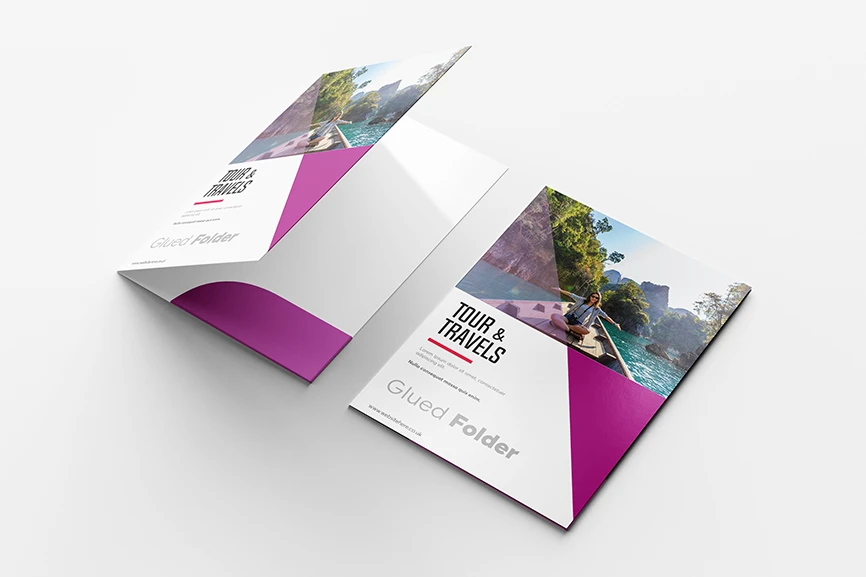
If you want the most premium feel, go for a Glued Presentation Folder. It’s the one you use when you’re sending a proposal to a high-value client, handing over contracts, or building a corporate pack that needs to feel strong and long-lasting. The glued build gives a firm structure, a better hold, and that “executive folder” impression people associate with serious brands.
If your goal is bulk distribution — for exhibitions, sales packs, training days, or internal company kits — the Interlocking Presentation Folder is the smarter option. It’s clean, practical and cost-effective, designed to assemble neatly without glue while still looking professional. It’s perfect when you need quantity without sacrificing brand image.
Either way, both styles are made to carry your message properly — not just hold paper.
Printed Presentation Folders Designed for UK Business Packs
Our folders are printed in full-colour so logos, gradients and brand colours look sharp and consistent. For a modern corporate finish, matte is a strong choice; for bold promotional packs, gloss gives more pop. And because folders are often used alongside other branded stationery, many businesses pair them with Letterheads to keep documents looking official, and add Compliment Slips for that small touch that feels surprisingly premium.
Want the folder to do more than hold documents? Add a brochure inside and it becomes a full sales tool. That’s why presentation folders are commonly ordered with Brochure Printing for company profiles and service guides. For networking packs, include Business Cards so clients can instantly keep your details without searching later. And if your folders are for trade shows, combining them with Roll-Up Banners helps you attract attention first — then hand over information in a neat, branded folder that looks expensive.
Presentation folders aren’t just a print product. They’re a brand signal — the kind that tells clients you’re organised, established and worth trusting.
Frequently Asked Questions
Do you provide a presentation folder template for design?
Yes. We provide a print-ready template so you can design your folder accurately with the correct size, folds, pockets and safe areas. Using the template helps avoid trimming or alignment issues.
- - - - - - - - - - - - - - - - - - - - - - - - - - - - - - - - - - - - - - - - - - - - - - - - - - - - - - - - - - - - -
What file format should I use for the folder artwork?
The best format is a high-resolution PDF (print-ready). We also accept AI / EPS files. If you’re using Photoshop, send a high-quality PDF export. Avoid sending low-quality JPGs or screenshots.
- - - - - - - - - - - - - - - - - - - - - - - - - - - - - - - - - - - - - - - - - - - - - - - - - - - - - - - - - - - - -
What bleed should I add to the presentation folder design?
You should add 3mm bleed on all sides (UK standard). Bleed prevents white edges after cutting and gives your folder a clean professional finish.
- - - - - - - - - - - - - - - - - - - - - - - - - - - - - - - - - - - - - - - - - - - - - - - - - - - - - - - - - - - - -
What is the safe area, and why is it important?
The safe area is the space inside the edges where important elements (logo, text, contact details) should stay. Keep all important content at least 5mm inside the cut line to avoid it being trimmed off.
- - - - - - - - - - - - - - - - - - - - - - - - - - - - - - - - - - - - - - - - - - - - - - - - - - - - - - - - - - - - -
Can I print on the inside of the folder as well?
Yes. Many businesses print the inside panels for a premium look—such as brand patterns, services, contact info or social media links. Inside print makes the folder feel more “high-end”.
- - - - - - - - - - - - - - - - - - - - - - - - - - - - - - - - - - - - - - - - - - - - - - - - - - - - - - - - - - - - -
Should I keep text away from the fold lines?
Yes. Avoid placing small text or thin lines directly on fold areas because folds can cause slight movement or cracking in design elements. Keep key text away from folds for best results.
- - - - - - - - - - - - - - - - - - - - - - - - - - - - - - - - - - - - - - - - - - - - - - - - - - - - - - - - - - - - -
Can I design glued and interlocking folders using the same template?
Not always. Glued and interlocking folders often have different pocket structures and cut lines, so the template may differ. Always use the correct template for the folder type you’re ordering.
- - - - - - - - - - - - - - - - - - - - - - - - - - - - - - - - - - - - - - - - - - - - - - - - - - - - - - - - - - - - -
What resolution should images be for folder printing?
Images should be 300 DPI for sharp print quality. Low-resolution images may look blurry or pixelated, especially on premium folders.
- - - - - - - - - - - - - - - - - - - - - - - - - - - - - - - - - - - - - - - - - - - - - - - - - - - - - - - - - - - - -
What colour mode should I use in the template?
Use CMYK colour mode for printing. RGB colours may look different after printing, so CMYK ensures more accurate output.